
Connect Rex
Connect Heeler over SSH to a Rex server that already runs on a Mac, Linux or Windows Host, and open its terminals on your iPhone or iPad while Rex keeps running them. A Host's Rex server is one of its Servers in Heeler, beside Herdr TUI, herdr-core, and tmux.
Important
Rex support is experimental. It was built and tested against Rex 0.1.0-preview.14 (Rex API revision 12) on macOS, and it opens the terminals and Agents Rex already has: see What Heeler does not do yet and Known limits.
Before you start
- A Heeler version after 0.1.20.
- Rex running on the Host under the account you will sign in as over SSH. Heeler connects only to a Rex server that is already running and never starts one.
- Remote Login turned on for the Mac and its SSH fingerprint noted: Prepare the Host. On Linux, run OpenSSH. On Windows, run Win32-OpenSSH, with
rex.exeon the account's PATH, as WinGet puts it; Heeler reaches the server through Rex's own stdio bridge, and Chat is not offered there yet. - On a Mac or Linux, an SSH server that allows forwarding to a Unix socket, as OpenSSH does by default. If its
sshd_configsetsAllowStreamLocalForwarding noorAllowTcpForwarding no, Heeler cannot reach Rex. - A way for your iPhone or iPad to reach the Host: directly on the same network, over an overlay network, or through a Jump Host. A Host can have multiple routes.
Add a Host
Heeler never starts Rex when connecting or checking. On a Mac or Linux it never runs the rex command; on Windows, where SSH cannot reach Rex's named pipe directly, each connection runs rex __internal dial-stdio --autostart=false, the bridge Rex's own command uses over SSH, which starts no server.
1. Connect
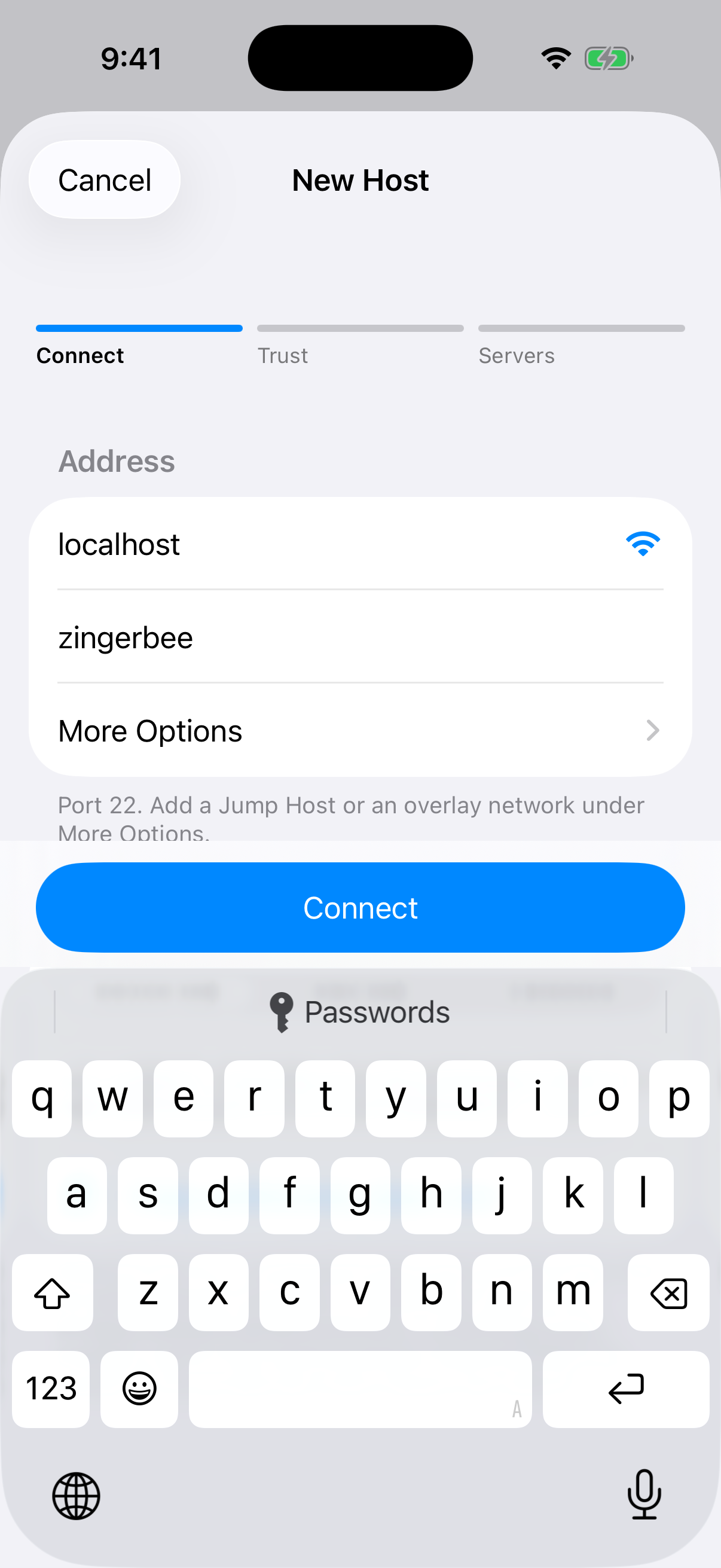
- In Hosts, tap +, or Add Manually when empty. You can scan a Pairing Code instead, which skips this step and goes straight to choosing the Servers.
- Enter the Address and the SSH User of the account that runs Rex. More Options has the port, a Jump Host and an overlay network.
- Pick Device Key, RSA Key, or Password. For Device Key, copy the public-key line into the Host's
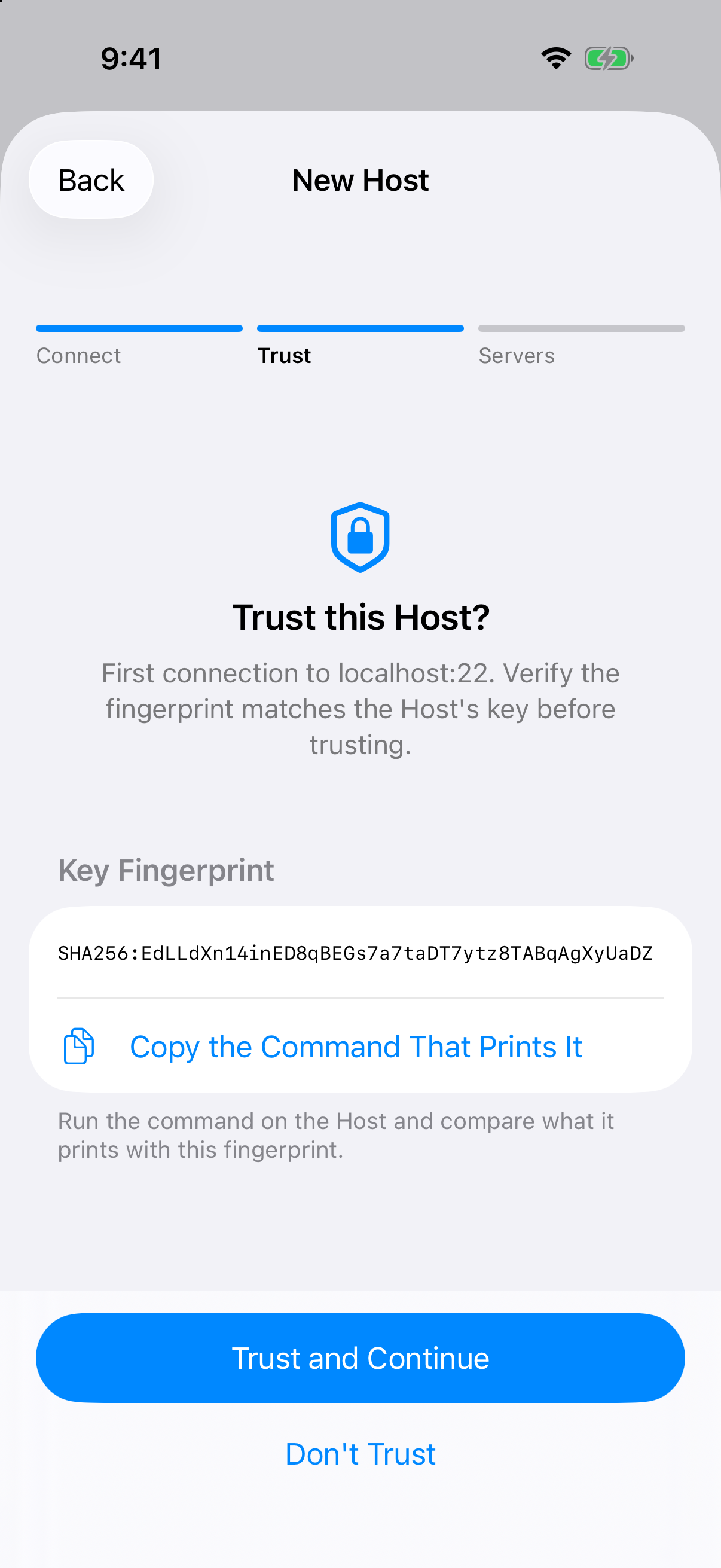
~/.ssh/authorized_keys. - Tap Connect, check the Host's key fingerprint, and tap Trust and Continue.
| Connect | Trust |
|---|---|
 |  |
2. Choose the Servers
Heeler looks once through your login shell without starting anything and lists what the machine runs. A Host has one Rex Server, listed as Rex:
| Heeler found | What to do |
|---|---|
| Rex reading Running | Leave Rex checked and tap Add Host with 1 Server. |
| Rex reading Not running | Rex is installed but not running, so Rex starts unchecked. Check Rex to have it connect once you start Rex. Or add the Host without it, start Rex, open the Host, tap Scan Again, and turn on Rex. |
| Rex alongside Herdr TUI, herdr-core, or tmux | Check each one you want in Heeler. They are all Servers of this one Host. |
| No Rex | Rex is not installed. Add the Host anyway, install and start Rex, open the Host, tap Scan Again, and turn on Rex. |
Each Server has a switch on the Host's page. Tap Rex while it is on to open its own page, with its checks. The connection is the Host's, under Routes. Add by Name… does not offer Rex: the Host's one Rex Server has no name to type, and Heeler lists it wherever Rex is installed.
If the Host's page reads Rex with Socket found, but this account cannot use it, Rex runs under another account. Add the machine again as another Host with that account's User.
It worked if the Host's row shows a green Rex tag, the Host's page lists Rex as Running, and the Server's page shows SSH connection, Rex installed, Rex server running, and protocol compatible passing.
When it does not connect
| Host reads | What to do |
|---|---|
| Rex is not running | Start Rex on the Host, then tap Run Checks Again. |
| The SSH server refuses socket forwarding | Allow forwarding to a Unix socket in the Host's SSH server (see Before you start), then tap Run Checks Again. |
| Rex is not answering | Heeler could not tell which of the two above it is. Check both, then tap Run Checks Again. |
| Rex did not let this account in | Rex runs under another account. Add the machine again as another Host with that account's User. |
| This version of Rex is not supported | Heeler works with Rex API revision 12 only. Update Rex if the message says it offers an older revision; if it offers a newer one, wait for a Heeler update. |
| Rex was not found on this Host | Install and start Rex, then tap Run Checks Again. |
The Console
Heeler shows your Rex layout as it is and changes nothing in it:
- Workspaces, Tabs, and Panes: Each Rex session is a Workspace, each window is a Tab, and each terminal is a Pane, in Rex's order. A session's terminals that are in none of its windows share a Tab named Detached. A session with no terminal is not listed.
- Agents and Terminals: A terminal whose program is Claude Code, Codex, or another coding Agent Heeler knows appears in Agents, with the status the Agent reports to Rex. Shells and other programs appear in Terminals, and a terminal moves back to Terminals when its Agent exits. A session whose terminals are all Agents appears in Agents only. Titles, programs, and directories follow Rex as they change.
| Status | What it means |
|---|---|
| Working | Running a turn. |
| Idle | Waiting at its prompt. |
| Blocked | Waiting for your answer. |
| Error | Reported an error and sorts with Blocked. |
| Done | Finished a turn while closed here. Opening the Agent clears Done on this device only. |
| Unknown | The Agent has not reported a status to Rex, or the last report came from another program, such as one that has since exited. |
An Agent started as a Rex terminal's own command rather than from its shell, or started with exec, stays in Terminals. Heeler sees a terminal's program change when the terminal next prints, so an Agent can take a moment to arrive in Agents or to leave it.
Working in a terminal
Tap a terminal in Terminals to open it. An Agent in Agents opens like an Agent on any other Host, with Chat and its terminal; when the Agent exits while it is open, it reads Agent Gone, and the terminal is back in Terminals. Other Rex clients keep showing it while you work:
- Opening: The terminal appears once Rex has redrawn its screen and history, so a long history can take a few seconds on a slow connection. A program that keeps writing, such as a spinner, can show a few lines twice or out of place until it pauses; Heeler then paints it again.
- Typing and pasting: Type in Text or Keys mode, tap Paste, or send a Snippet. You can type whichever device set the terminal's size. What you type reaches the terminal in order, and Heeler never sends it twice: when the connection drops before Rex answers, the terminal shows Connection dropped with Reattach, and nothing typed after that point was sent. Keys typed while Heeler reconnects are not sent either; the terminal reconnects and paints again. A paste too large to send in one piece is blocked rather than split; paste less at a time.
- Ending: When a terminal closes in Rex or its program exits, its view ends.
When a terminal stops, it says why:
| Terminal reads | What to do |
|---|---|
| Connection dropped | Something you typed may not have arrived. Tap Reattach and check the screen before typing again. |
| This terminal's history is too long to show | Clear the terminal's scrollback in Rex, then tap Reattach. |
| Rex stopped sending this terminal's output | Rex stopped the terminal's output while the Host stayed connected. Tap Reattach. When the connection to the Host drops, the terminal reconnects and paints again by itself instead. |
| This Terminal belongs to a Rex server that is gone | Rex restarted. Open the terminal again from Terminals. |
Fitted to your screen
A Rex terminal has one size, set by one device at a time. When you open a Rex terminal from Terminals, or show an Agent's terminal, Heeler fits it to your screen before it appears. Chat never resizes the terminal. Rex resizes the terminal itself, not only your view of it, so every device showing it, the Rex app on your Mac included, gets your screen's size while you have it open here. Heeler gives the size back when you leave the terminal, when Heeler goes to the background, or when the terminal ends, and the device that had it gets it back. Coming back fits it again.
Sized for another device
When another device, such as the Rex app, takes the size while you have the terminal open, Heeler leaves it with that device instead of taking it back. The same happens when fitting does not go through. Heeler then shows the terminal at that device's size without scaling it: lines wider than your screen wrap onto the next row, so a program drawn to the full width, such as a table or an editor, can look jumbled. After a second Sized for another device appears over the terminal, at the bottom while the output ends in its upper half and at the top otherwise, so it stays clear of the prompt:
- Fit to Screen takes the size back for your screen.
- The × button dismisses the notice and keeps the other device's size while you stay. The notice returns when yet another device sets the size.
- If tapping Fit to Screen does not go through, the notice says why, and Try Again asks once more.
Leaving the terminal and coming back fits it to your screen again.
On iPad, one window at a time shows a Rex Host's Agent terminals. Another window that opens one reads Live in Another Window; tap Take Over Here to move it there.
Chat
Chat works for Claude Code, Codex, Pi, and Oh My Pi in Rex on macOS and Linux. Claude Code and Codex need nothing installed on the Host; Pi and Oh My Pi need Heeler's extension, which Chat offers to add. Heeler reads the conversation over the Host's SSH connection and types into the terminal through Rex, without resizing it. You can read the conversation, Send a message, Stop a turn, and tap buttons on Blocked prompts:
| Program | Session notes |
|---|---|
| Claude Code | Binds from the running Claude Code itself. After /clear or /resume, Chat checks again before it sends your next message. |
| Codex | Binds once it holds its conversation file, after the first message. Start it with --no-daemon (why); without it, Chat shows Codex Started Without --no-daemon instead of the conversation. |
| Pi | Binds through Heeler's extension, as soon as Pi starts. After /new, Chat checks again before it sends your next message. |
| Oh My Pi | Binds through Heeler's extension, as soon as Oh My Pi starts. Without the extension, Chat follows the conversation after its first message. After /new, Chat checks again before it sends your next message. |
| Other Agents | No Chat on Rex Hosts yet. They open on their terminal. |
- Can't Tell the Conversation: When Chat cannot prove which conversation the Agent shows, it says so with Check Again. For Claude Code and Codex, tap Choose a Conversation, preview one, and tap Use This Conversation. Heeler keeps that choice on this device, for this terminal, until the Agent exits or Rex restarts. Nothing is written on the Host. For Pi and Oh My Pi, add Heeler's extension instead.
- Send: Send pastes your message and presses Enter once it checks that the same Agent still holds the terminal, is not Blocked, and accepts a paste. The Composer under the terminal sends the same way. If Rex does not answer, Heeler never sends the message again; check the terminal first.
- Stop and Blocked prompts follow the Agent's status. While the Agent reads Working and your message is empty, Send becomes Stop, which presses Esc once it checks that the same Agent still holds the terminal. A card with buttons appears while it reads Blocked. An Agent that reports no status to Rex reads Unknown: it gets no Stop and no card, so stop or answer it in its terminal. A Claude Code that has finished its turn while a command it put in the background still runs reads Done or Idle, so you can send its next message; Stop never ends that command, so end it in the terminal.
- Commands:
/offers/compactwhile the Agent reports it is idle, and not the Agent's skills. Use the terminal for the rest. - Images and files: In Chat or on the Agent's terminal, tap +, then Add Image, Paste Image or Add File. Heeler uploads the file over the Host's SSH connection, not through Rex, into a new folder in the temporary folder of the account you sign in with, and adds its path to your message; Send types the path with your message, once. An image is sent as a JPEG or PNG of at most 16 MiB, and a file can be up to 64 MiB. Heeler never deletes uploaded files from the Host. If Rex restarts, an upload started afterwards stops with This Terminal belongs to a Rex server that is gone; one already under way finishes and its file stays on the Host, but Send then refuses the message with the same words. Open the Agent again from the list.
Pi and Oh My Pi
Pi and Oh My Pi tell Chat which conversation they are in through Heeler's extension, one file named heeler-session.js in the Agent's own extension folder, such as ~/.pi/agent/extensions. Rex has no Host Helper to bring it, so Chat asks you instead:
- Open the Agent and show Chat. It reads Can't Tell the Conversation, with Add Heeler's Extension….
- Tap Add Heeler's Extension…. Heeler shows the one folder it will write to, found from the running Agent.
- Tap Add to This Folder. Heeler writes the file over the Host's SSH connection, replacing an older copy of it, and nothing else.
- Quit the Agent and start it again in the same terminal. It loads the extension as it starts.
It worked if Chat shows the Agent's conversation by itself a few seconds after the Agent starts.
- Still Can't Tell the Conversation: When the message says the Agent hasn't loaded the extension, the Agent was started before you added it, or with
--no-extensions. Start it again with its extensions on. - What the extension does: Pi and Oh My Pi load it for every session on the Host. In a Rex terminal it keeps one small file per running Agent in a
heeler-sessionfolder beside the extension folder, naming the conversation, and removes it when the Agent quits. Outside Rex, tmux, and herdr-core it does nothing. - Removing it: Delete
heeler-session.jsfrom the extension folder, and theheeler-sessionfolder beside it.
What Heeler does not do yet
- Status, Chat and attachments only: no Changes, Skills, Agent Notifications, Live Activities, Usage, or widgets for Rex. A Host's other Servers keep theirs.
- Nothing started, renamed, or closed: New Agent, New Terminal, New Workspace, Rename, and Close are not offered. Do these in Rex; Heeler shows the result.
- No Worktrees, Host Helper, or Add by Name for Rex.
Known limits
- Rex API revision 12 only: A Rex that does not offer revision 12 is refused. Heeler was built and tested against Rex 0.1.0-preview.14.
- Linux not yet tried: Heeler looks where Rex keeps its socket on Linux, but no Linux Rex server has been tried yet.
- What the first paint leaves out: Rex's redraw does not carry the cursor shape or the terminal's own default colors, so the cursor keeps Heeler's shape until the program sets it again, and the terminal wears your Heeler theme. While a full-screen program is open, the history behind it appears only after the program closes.
- Another device's size does not fit: While a terminal stays at a size another device set wider than your screen (see Sized for another device), its lines wrap at your screen's width, so a full-width program can look jumbled. While its screen holds a line wider than yours, the cursor, new output and what you type can also land on the wrong row, over earlier text, until Fit to Screen paints it again. Heeler does not scale it down or cut it off.
- What has been tested so far: Rex has been tried in the iOS Simulator against Rex 0.1.0-preview.14 on macOS, with test clients standing in for other devices. Apart from one Chat message sent from an iPhone (below), they have not been tried on a physical iPhone or iPad. They have not been tried with the Rex app showing the same terminal either.
- Chat with real Agents tried only in the Simulator: In the iOS Simulator, Chat was tried with a real Claude Code, Codex, Pi, and Oh My Pi running in Rex on macOS: reading the conversation, Send, and Stop for all four, and the buttons on Blocked prompts for Claude Code and Codex. On an iPhone, one message sent from Chat reached a real Codex 0.169.0 running in Rex, which answered it. That was an earlier build, which refused every later Send once Codex's answer drew links. Chat now reads such links, but Chat has not been tried again on an iPhone or iPad. Pi and Oh My Pi have not been tried on Linux, or with an Oh My Pi profile.
- Uploads not yet tried on a device: Images and files were tried in the iOS Simulator against a running Rex server: an image with a real Claude Code, Codex, Grok Build, Antigravity CLI, Pi, and Oh My Pi, and a text file with Claude Code and Codex. They have not been tried from a physical iPhone or iPad.
Last checked on 2026-11-18 against Rex 0.1.0-preview.14 (API revision 12) on macOS, with test programs and, in the iOS Simulator, real Agents.