
Connect tmux
Connect Heeler to a tmux server you already run on a Mac or Linux Host over SSH, alongside Herdr TUI and herdr-core. Each tmux socket is a Server of its Host in Heeler, with your sessions, windows, and coding Agents in the Console and native Chat.
Before you start
- Remote Login turned on for the Mac and its SSH fingerprint noted: Prepare the Host. On Linux, run OpenSSH. Native Windows is not supported for tmux Hosts.
- tmux 3.3 or newer (
tmux -V) on your login shell'sPATH. Ubuntu 22.04 and AlmaLinux or Rocky Linux 9 ship tmux 3.2a, so install a newer build there first. - A running tmux server on the Mac (
tmuxortmux -L <name>). On Linux, you can start tmux ahead of time or let New Workspace start it later. - A way for your iPhone or iPad to reach the Host: directly on the same network, over an overlay network, or through a Jump Host. A Host can have multiple routes.
Add a Host
Heeler never starts a tmux server when connecting or checking.
1. Connect
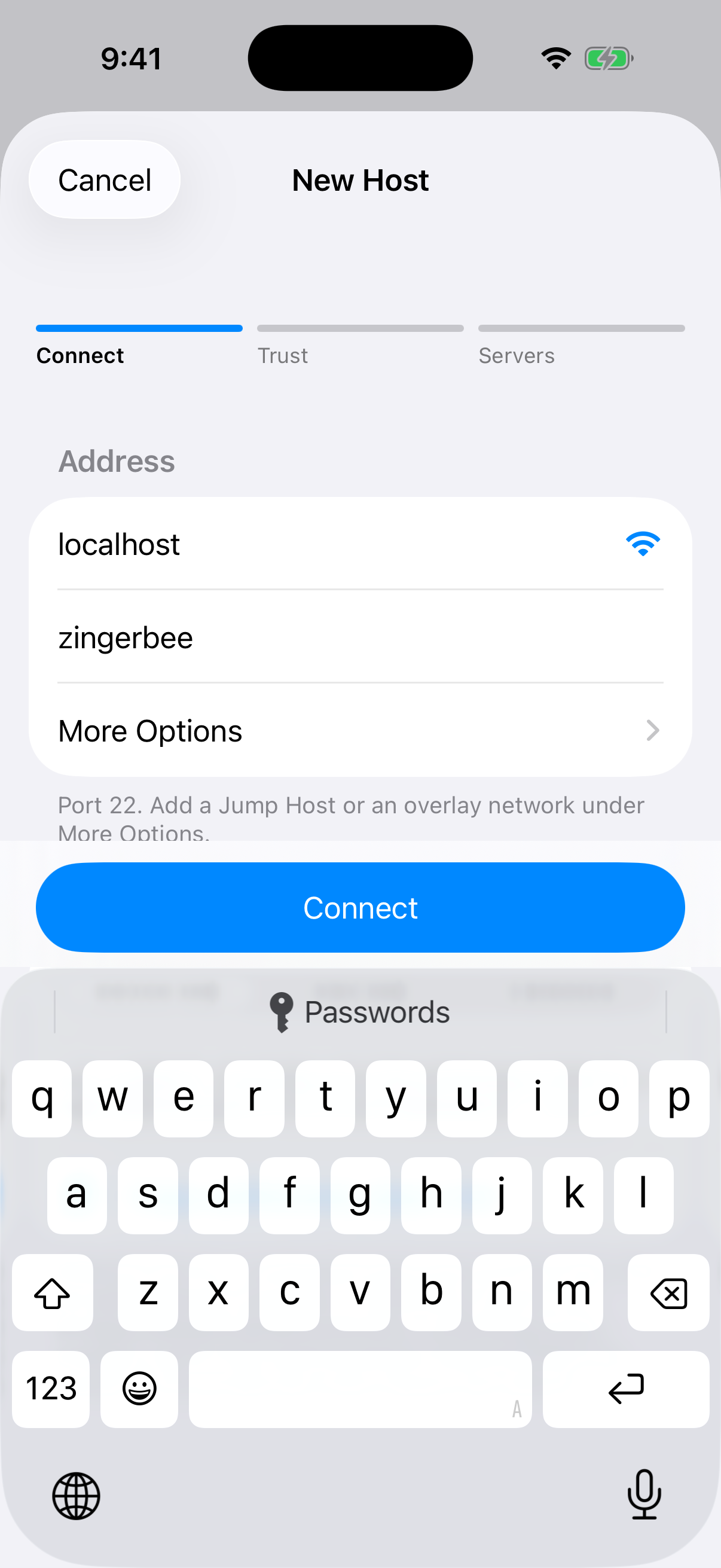
- In Hosts, tap +, or Add Manually when empty. A Pairing Code always adds a Herdr TUI Server.
- Enter the Address and your SSH User. More Options has the port, a Jump Host and an overlay network.
- Pick Device Key, RSA Key, or Password. For Device Key, copy the public-key line into the Host's
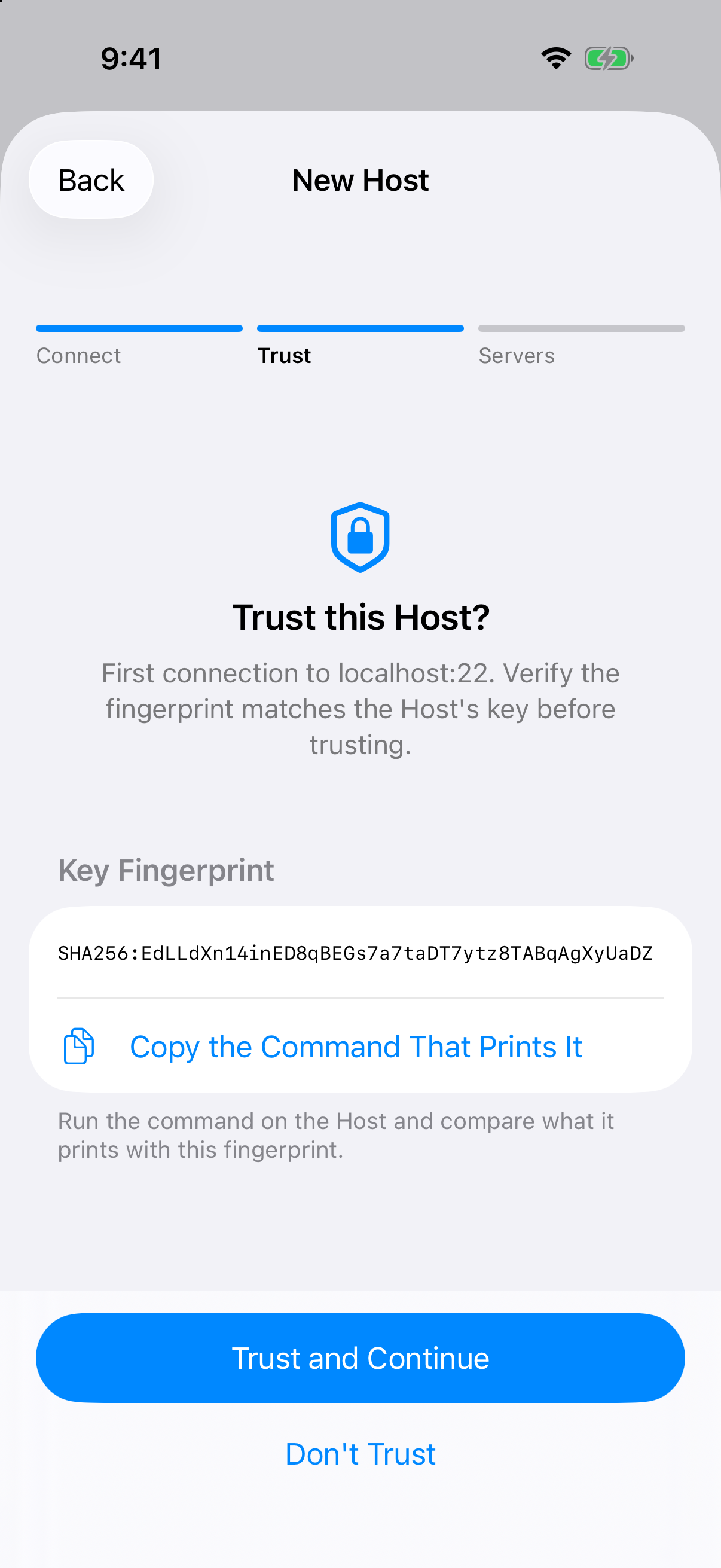
~/.ssh/authorized_keys. - Tap Connect, check the Host's key fingerprint, and tap Trust and Continue.
| Connect | Trust |
|---|---|
 |  |
2. Choose the Servers
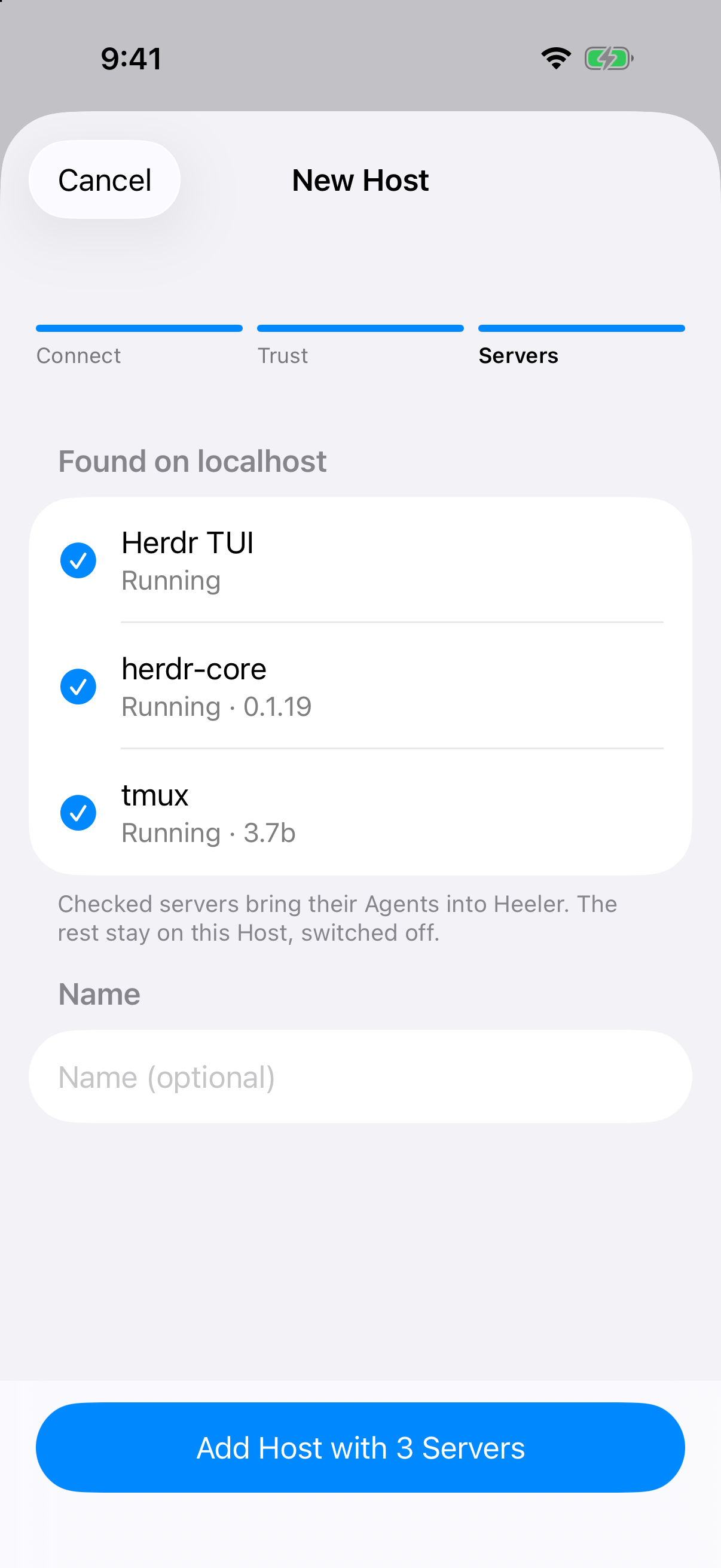
Heeler looks once through your login shell without starting anything and lists what the machine runs:
| Heeler found | What to do |
|---|---|
| One tmux server | Leave tmux checked and tap Add Host with 1 Server. |
| More than one tmux server | Each socket is listed by name, such as tmux · work for tmux -L work. Check the ones you want. |
| tmux alongside Herdr TUI or herdr-core | Check each one you want in Heeler. They are all Servers of this one Host. |
| No running server | Add the Host anyway. Start tmux, open the Host, tap Scan Again, and turn on tmux. |
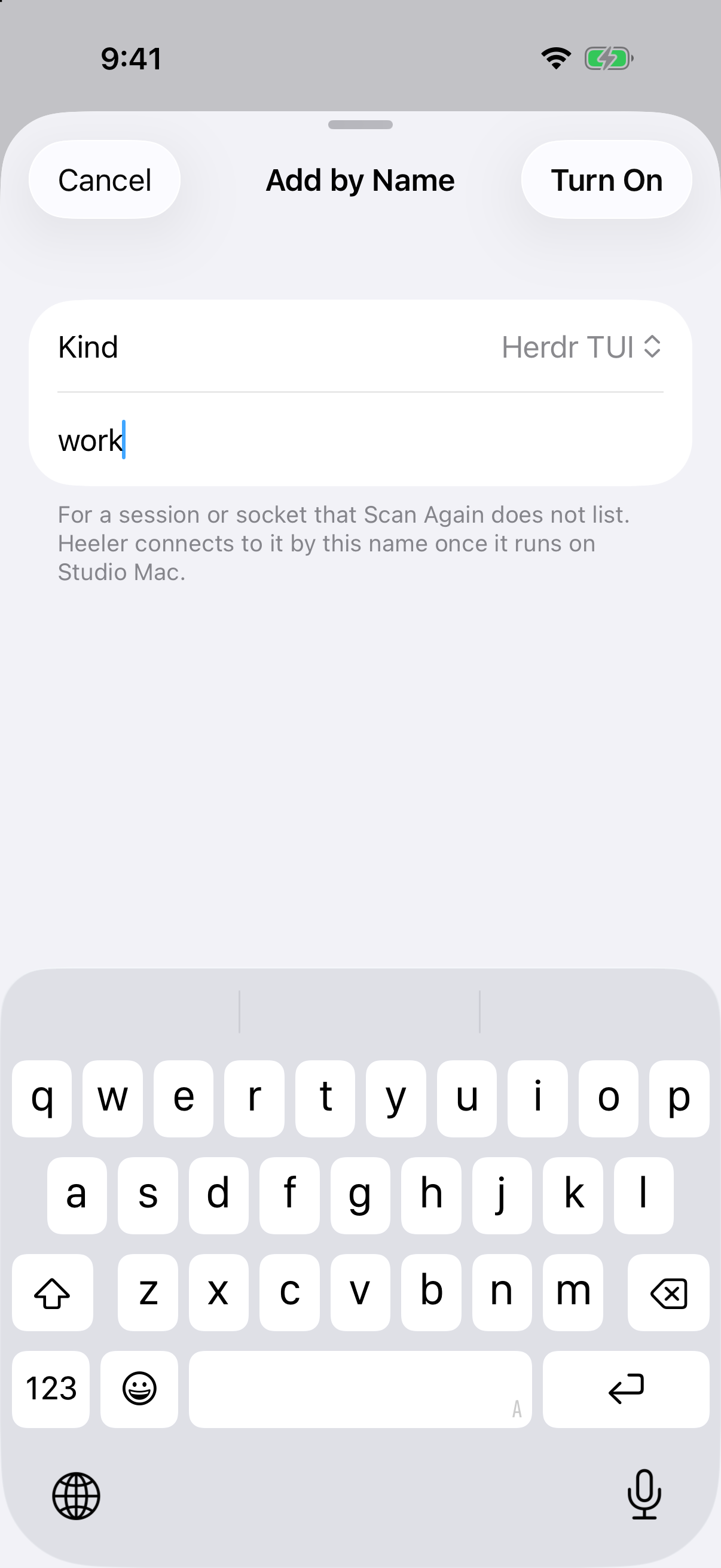
Each Server has a switch on the Host's page. Tap a Server that is on to open its own page, with its connection, checks and Host Helper. To turn on a socket before its server runs, tap Add by Name… on the Host's page, choose tmux, type the -L <name> socket name (blank for default), and tap Turn On. Custom socket file paths (tmux -S <path>) cannot be typed.
| The Host's page | Add by Name |
|---|---|
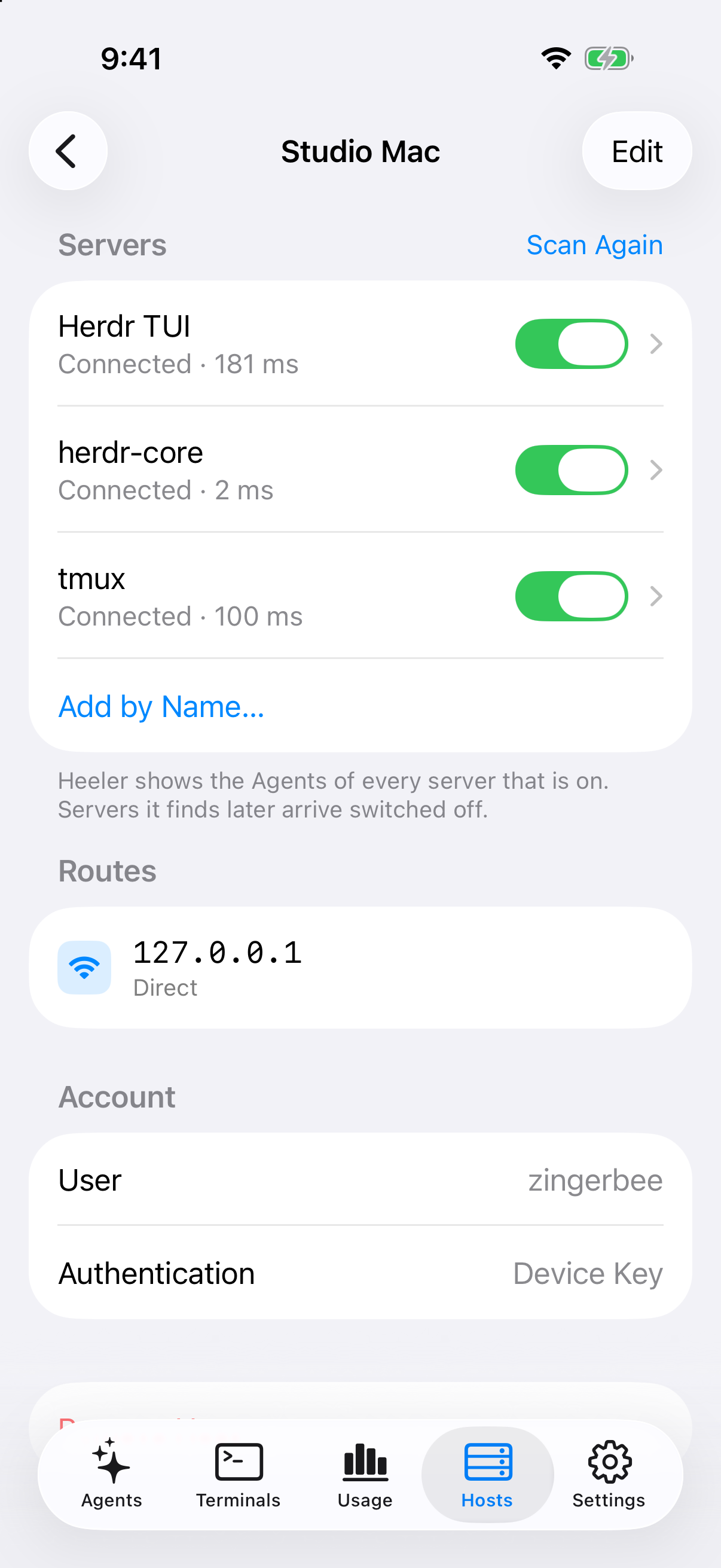 |  |
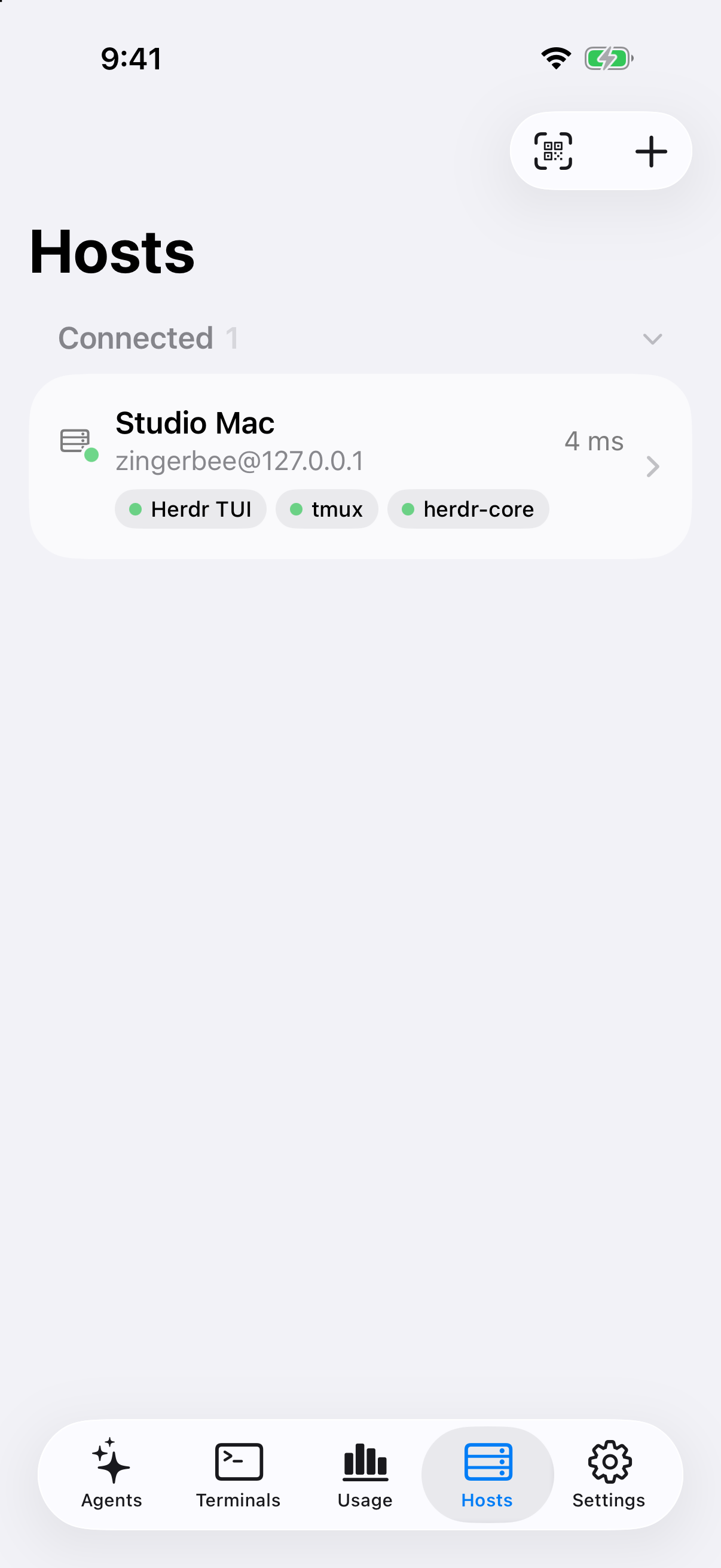
It worked if the Host's row shows a green tmux tag, and the Server's page shows Server Kind as tmux with the version, Socket with your socket name, and tmux server running passing.
When it does not connect
While the tmux server is stopped, Heeler rechecks on its own, or you can tap Run Checks Again:
| Host reads | What to do |
|---|---|
| No tmux server running | Start tmux (or tmux -L <name>) on the Host, or on Linux use New Workspace in New Agent or New Terminal. |
| Start tmux on the Mac first | Shown on macOS when New Workspace runs with no server, because a server started over SSH would lack your Mac login session and keychain. Start tmux in Terminal on the Mac. |
| tmux is not installed | Install tmux 3.3 or newer on your login shell's PATH, then tap Run Checks Again. |
| Update required | Upgrade tmux on the Host to 3.3 or newer, then tap Run Checks Again. |
On Linux when no tmux server is running, choosing New Workspace in New Agent or New Terminal starts the server through your interactive login shell so new windows inherit your shell setup.
Note
The Server's page warns if variables from an agent session leaked into tmux and shows how to clear them.
The Console
Heeler maps your tmux layout directly into the Console without changing your existing options or key bindings:
- Workspaces, Tabs, and Panes: Each tmux session is a Workspace, each window is a Tab, and each pane is a Pane, in tmux's order. A window linked into more than one session appears once.
- Agents and Terminals: Panes running Claude Code, Codex, Grok Build, OpenCode, Pi, or Oh My Pi appear in Agents. Shells and other programs appear in Terminals.
| Status | What it means |
|---|---|
| Working | Running a turn. |
| Idle | Waiting at its prompt. |
| Blocked | Waiting for your answer, or running an approved tool in Claude Code. |
| Error | Reported an error and sorts with Blocked. |
| Done | Finished a turn while closed here. Opening the Agent clears Done on this device only. |
| Unknown | No status reported yet. Tap Unknown to see what this program needs on tmux. |
When Grok Build shows Unknown, tap Unknown, then Turn On Grok Build's Status and Apply This Change to set program_status = "on" in $GROK_HOME/config.toml or ~/.grok/config.toml, and install the Host Helper so Heeler can read its reports. Revert the file change anytime with Undo or under Harness Edits on the Server's page.
Starting things
- New Agent: Tap New Agent, choose a Workspace (tmux session) and directory, and pick an Agent from your login shell's
PATHor a Preset from Settings > Agents & Accounts. Heeler opens a new window in the background without switching your desktop client's active window, passes--no-daemonto Codex unless your arguments set a session, and passes Heeler's status hooks to Claude Code for that launch automatically. - New Terminal: Opens a new window running your login shell in the chosen Workspace.
- New Workspace: Creates a new tmux session with the name you type, or tmux's numbered default when left blank.
- Rename Workspace: In an Agent's or Terminal's More menu, tap Rename Workspace to rename the tmux session.
- Worktrees: Turn on Start in a new worktree in New Agent and enter a Branch to check out
~/.heeler/worktrees/<repository>/<branch>in its own tmux session. To remove it, tap More > Worktree Details > Remove Worktree; Heeler closes that worktree session's panes first, then removes the checkout.
Working with an Agent
Live terminals open on the Pane itself, even when a tmux window is split across several panes, and any viewer can type without a Take Over step:
- Window sizing: While you view a Pane on iPhone or iPad, Heeler sizes that window to fit your screen and stays within an open desktop terminal on the same window. Leaving the Pane hands window sizing back to your other clients, and other windows in the session are not resized.
- Send and Stop: Send pastes your draft and presses Enter once it checks that the same Agent still leads the pane, is not Blocked, and accepts a paste. While Working or Blocked with an empty draft, Send becomes Stop for every supported Agent, Grok Build included.
- Add: Tap Add in the Composer, or Add Image, Paste Image, or Add File under More in Direct Input, to upload an image or file over SFTP and insert its path.
- Changes and Skills: Open Changes from an Agent's header or More menu to inspect uncommitted Git changes in its directory, and use
/or Skills in the Composer, Direct Input, or Chat to browse and insert skills from the Host. - Close: Closing an Agent or Terminal closes its pane or window.
Newline keys in Direct Input
Under tmux's default extended-keys off, tmux does not pass modified Return keys such as Shift-Return through as distinct keys, and Heeler withholds keys tmux has not enabled so their names are never typed as text:
| Key | Behavior in tmux |
|---|---|
| Control-J | Inserts a new line in Claude Code, Codex, Grok Build, OpenCode, Pi, and Oh My Pi without changing tmux settings. |
| Option-Return | Inserts a new line in Claude Code, Codex, Grok Build, OpenCode, and Oh My Pi; submits in Pi. |
| Shift-Return | Inserts a new line in Claude Code, OpenCode, Pi, and Oh My Pi on tmux 3.5 or newer when ~/.tmux.conf sets set -g extended-keys on. In Codex and Grok Build, Shift-Return does nothing from Heeler; use Control-J or Option-Return instead. |
When Send or Stop in the Composer cannot finish cleanly, it keeps your draft and shows the same recovery notices as herdr-core.
Claude Code hooks
Claude Code Agents you launch from New Agent report Working, Blocked, Done, Error, and their session automatically without changing ~/.claude/settings.json.
To get the same status and Chat session hint for Claude Code Agents you start yourself in a tmux terminal:
- Connect the Host, open it in Hosts, tap its tmux Server, and find Claude Code Hooks.
- On Default (
~/.claude/settings.json), or on any added Claude Code Account, tap Add Hooks. - Review the exact settings diff and script files Heeler will write, then tap Apply This Change.
It worked if that root's row in Claude Code Hooks reads On.
- The hooks work even without the Host Helper, and do nothing when Claude Code runs outside tmux (including under Herdr TUI or herdr-core).
- In a folder you have not trusted yet, Claude Code runs no hooks until you accept its trust prompt, so the Agent reads Unknown until then.
- After you approve a permission prompt in Claude Code, the Agent can stay Blocked while a long tool finishes; Stop remains available in the Composer. If you interrupt Claude Code with Esc at a desktop terminal while it waits on its model, it can stay Working until its next event.
- To remove the hooks later, return to Claude Code Hooks, tap Remove Hooks, and tap Apply This Change.
Chat
In Chat, you can read conversations, Send messages, Stop a turn, and tap buttons on Blocked prompts without resizing your tmux window:
| Program | Session notes |
|---|---|
| Claude Code | Follows /clear and /resume when launched from New Agent or with Claude Code hooks; otherwise use Choose a Conversation. |
| Codex | Binds on the first message when started with --no-daemon (why --no-daemon is needed). |
| Grok Build | Binds while Grok Build lists one conversation; after /new, restart or use Choose a Conversation. |
| Pi | Binds when started from New Agent or with the Host Helper; otherwise use Choose a Conversation. |
| Oh My Pi | Binds with the Host Helper, or after its first message opens its session file; otherwise use Choose a Conversation. |
| OpenCode | Off for tmux Hosts. Offers the terminal only. |
When Chat cannot prove which conversation a Pane is showing, it displays Can't Tell the Conversation with Check Again and Choose a Conversation. Picking a conversation and tapping Use This Conversation remembers that choice for the Pane until the Agent or tmux server ends.
Host Helper
Everyday terminal and Chat use do not require the Host Helper. Install it on macOS or Linux (Node.js 20 or newer) to add:
- Agent Notifications (Blocked, Error, and Done), in-app banners, and Live Activity;
- Usage (Token Usage, Usage Limits, and Home Screen and Lock Screen widgets);
- Codex, Grok Build, and OpenCode status: reports status for panes running those programs (Grok Build also needs Turn On Grok Build's Status);
- Pi and Oh My Pi status and Chat: installs Heeler's extension so panes you start yourself report Idle, Working, Done, Error, and their active Chat conversation;
- Desktop Esc cleanup for Claude Code: clears Blocked when you decline a permission prompt with Esc on the desktop.
Open the Host in Hosts, tap its tmux Server, tap Host Helper, review Files This Writes, tap Install, and turn on the Host under Settings > Notifications, following the same steps and status table as Connect herdr-core. Removing the Host Helper leaves any Claude Code hooks you added working.
Known limits
- macOS and Linux with tmux 3.3 or newer: Native Windows is not supported, and tmux servers are chosen by
-Lsocket name rather than a custom-Ssocket path. - tmux older than 3.5: Shift-Return never reaches the Agent; use Control-J (or Option-Return outside Pi).
- Desktop terminal shrinking under
window-size largest: tmux sends no notice when another terminal resizes on its own, so underwindow-size largesta desktop terminal that shrinks without detaching or changing windows is re-capped on the next window or client change rather than right away, and if reading client sizes fails Heeler leaves the window size alone. - No Templates, Take Over, or Agent/Tab rename: herdr-core Templates, Take Over, pane zoom, and renaming Agents or Tabs from Heeler are not offered; programs set their own pane titles, and Tab names follow tmux window names.
- OpenCode Chat is off: OpenCode Agents offer the live terminal only, and OpenCode status inside tmux comes from source review rather than a live run.
- Pi and Oh My Pi extensions: They report Idle, Working, Done, and Error, not Blocked, and starting Pi via
npxdoes not load the extension. - Panes already redirecting output: If you already redirect a pane's output in tmux, Heeler leaves it alone and Codex, Grok Build, or OpenCode in that pane stays Unknown.
- Wrapper scripts: A script that starts an Agent as a child process stays in Terminals; end the script with
exec, such asexec claude "$@", so the Agent leads the pane. - What has been tested so far: tmux Hosts have been exercised against the automated SSH test fixture on macOS with tmux 3.3a and 3.7b; Linux Hosts (including starting a stopped server from New Workspace) and end-to-end app runs with live Agents, Chat, Claude Code hooks, and the Host Helper on a real machine have not been run yet.
Last checked on 2026-11-12 against the test fixture on macOS with tmux 3.3a and 3.7b.